
Kilevel
Dashboard

Language / Sprache

KILEVEL © 2026

Appointment Booking

The Hard Part Is the Calendar, Not the Conversation

Any agent can say "how about Tuesday". The hard part is that Tuesday has to be true — against the same schedule your public booking page reads, at the same moment somebody else might be taking it. So there is one availability engine here and three ways into it, rather than three calendars quietly drifting apart.

Availability Is a Shape, Not a List

Most booking tools ask you to maintain a list of free times. That is exactly backwards: what you maintain is the pattern — the week, the slot length, the capacity — and an open appointment is what is left over. Exceptions are additions to and subtractions from that shape rather than rows in a table somebody has to keep current.

MONTUEWEDTHUFRINOT A LIST OF FREE TIMESA pattern with holesONE-OFF · WEEKDAYS · DATE RANGEAdditions drop in
The openings are the schedule, not the entries. Taken slots are plugged, closed hours are simply solid, and additions drop in as new openings cut into the deck.

A week that is actually a week

Monday to Sunday, each with its own opening and closing time, its own slot length, and an on/off switch. Sunday being closed is the absence of slots, not a list of blocked ones.

Additions in four shapes

One specific date, a set of weekdays, a date range, or a start time that repeats until a cut-off. Late-night consultations every second Thursday in March is a thing you describe once, not a thing you enter twelve times.

A slot can hold more than one person

Capacity is per slot, not per calendar. A one-to-one consultation and a twelve-seat group session are the same mechanism with a different number on it.

How soon, and how far ahead

A minimum distance keeps anybody from booking you in eleven minutes, and a maximum keeps the page from offering next March. Both are day counts on the page rather than rules in somebody's head.

More than one calendar

Calendars are named things you create — one per room, per service, per practitioner — and a booking page or an agent is pointed at the set of them it is allowed to see.

Timezones, not a disclaimer

The schedule is authored in your time and rendered in theirs, detected from the browser and overridable from a picker. Nobody has to do arithmetic to find out when 14:00 is.
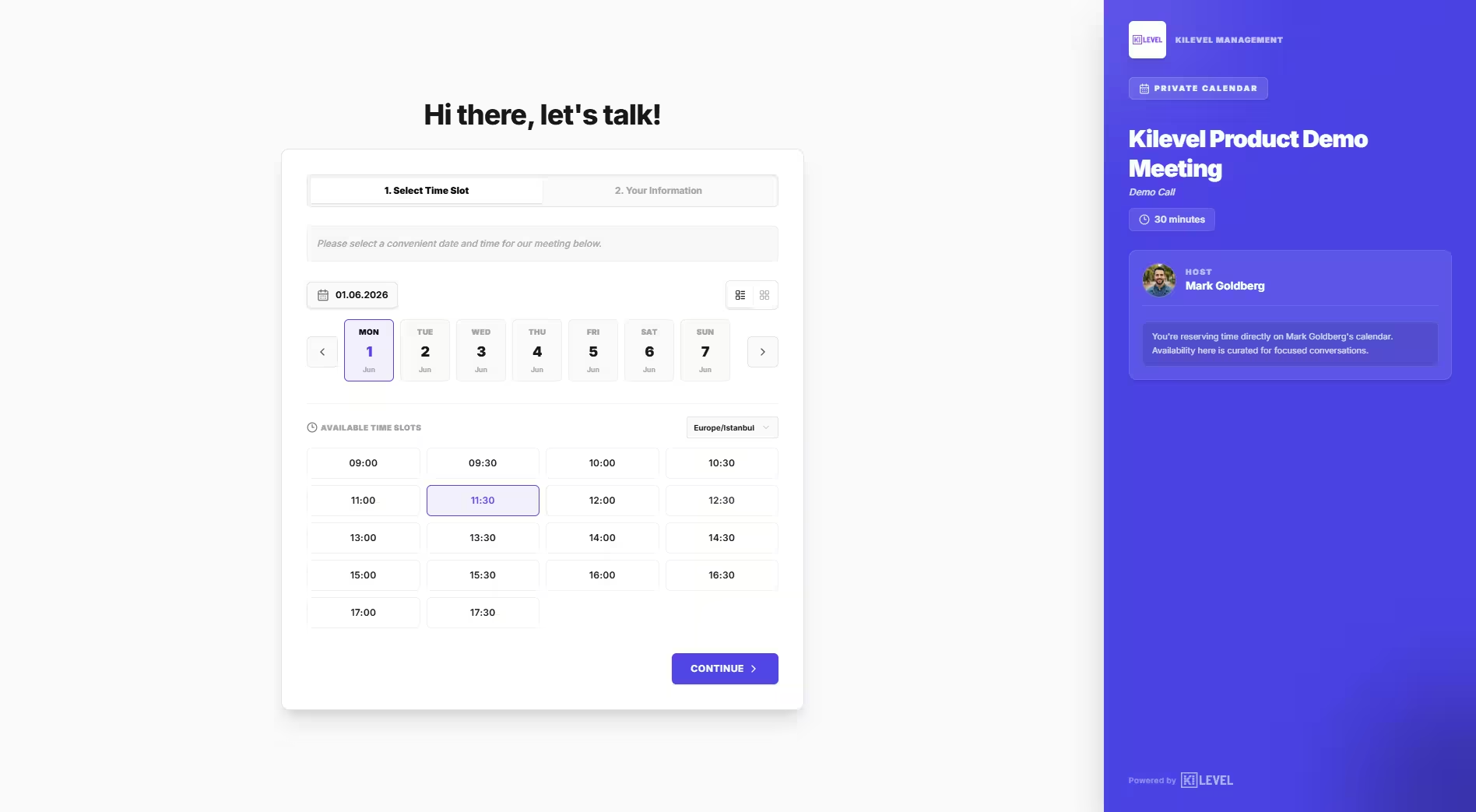
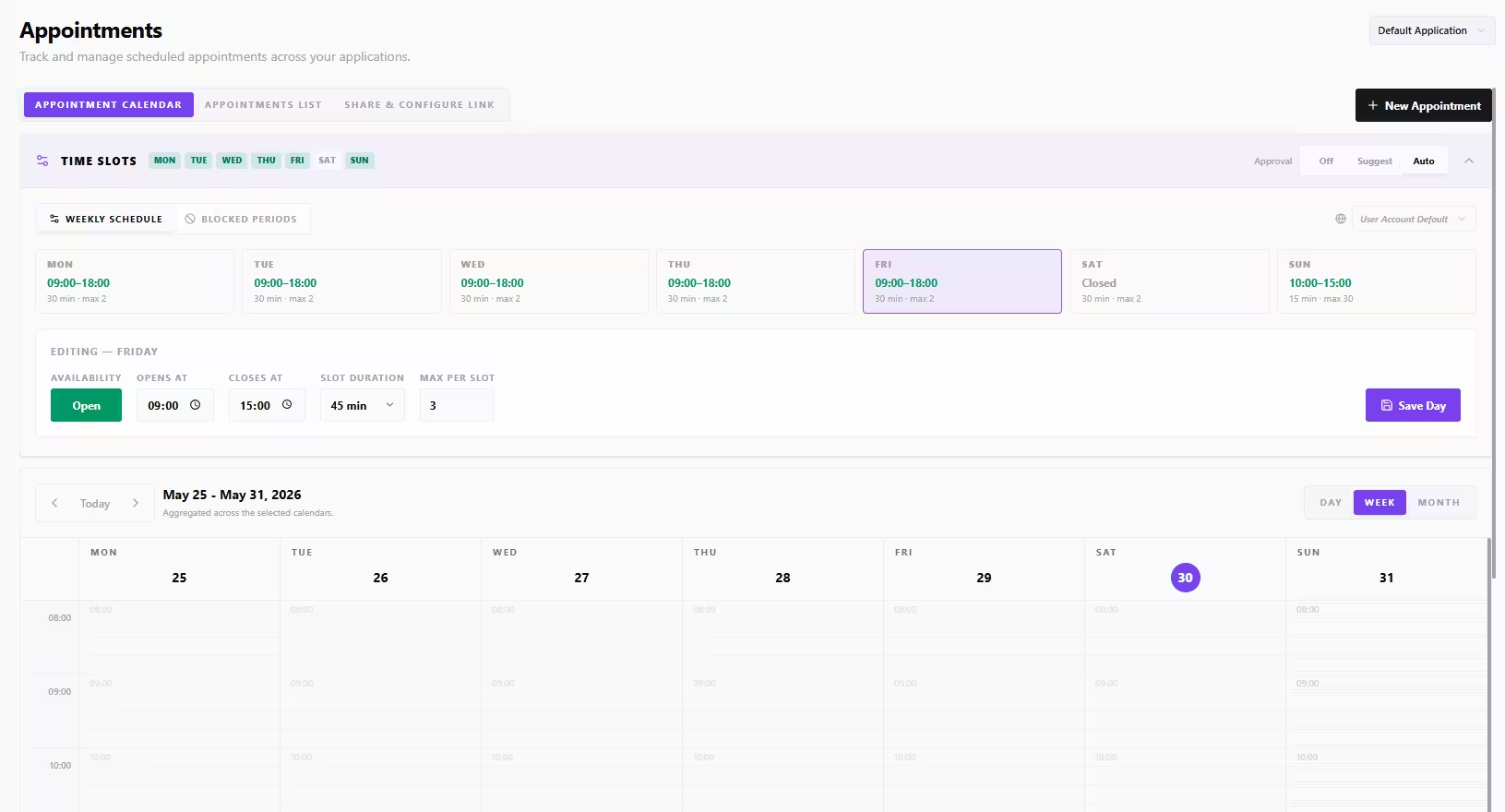
Kilevel public booking page: available slots for a chosen day, in the visitor's own timezone, with the customer form beside itKilevel calendar configuration: weekday schedules, slot duration, capacity per slot and one-off additions
Enlarge

A Public Page That Reads the Real Schedule

Your logo, your colour, your typeface, on your own slug. It detects the visitor's timezone and language, shows only the slots your schedule actually allows on that day, and collects exactly the fields you asked for — each one required, optional or not shown at all.

One Engine, Three Ways In

This is the reason a double booking does not fall through a crack here. The public page, the agent mid-conversation and your own backend all ask the same place — they are not reading three copies of one calendar that reconcile overnight.

Your booking page

A public URL on your own slug that anybody can open and book from, with no account and no app.

/book/your-slugtimezone-awarebranded

The agent, mid-conversation

Voice or chat. It checks working hours, reads genuine slots, creates the appointment, and can move or cancel it later.

get_working_hoursget_available_time_slotscreate_appointmentreschedule_appointmentcancel_appointment

Your own systems

The same operations are reachable from an automation node or over the API, so your site, your app or your CRM can book without a human in the middle.

automation nodeREST APIwebhook
What the agent knows about a slot
Thu 14:30First consultation · 45 min
Inside opening hoursCapacity leftPast the minimum noticeCalendar assignedMeeting link
Seats in this slot3 / 4

A slot is not a timestamp. It carries its duration, its capacity and the rules that made it exist at all.

What a public page has to survive
Human verification
Rate limit per IP
Cap per email
Cap per browser
Allowed calendars
Booking radius

A booking page is a public write endpoint with no login in front of it. Treating it as one is the difference between a full calendar and a flooded one.

The Page Your Customers See

It is part of your presence, not ours. And because it is public and unauthenticated, it carries the unglamorous things nobody puts on a feature list.

It looks like you, not like us

Logo, brand colour, typeface, a profile photo, your own heading and greeting sentence, and a choice of two layouts — the slot list beside the form, or one column the visitor moves down.

In the language they arrived in

You list the languages the page offers and which one is the default; it can also pick one up from the browser. The display language and the booking language are separate settings, because they are separate questions.

The fields you actually need

Name, email, phone, company and notes are each required, optional or hidden, and you can add your own fields beside them with their own labels and placeholders. A form nobody has to skip past.

And the part nobody advertises

A public booking page is a public write endpoint. This one carries human verification, request rate limiting, and caps on how many live bookings a single email address or a single browser may hold at once.

What you set on the page
Logo
Brand colour
Typeface
Profile photo
Layout
Languages
Timezone
Custom fields
Greeting
Meeting link
Booking radius
Calendars

All of it without writing any code

And a slug you own
Address/book/your-slug
More than oneper team, per service
Cancel linkone per booking

What Happens After the Booking

A booked appointment is the beginning, not the end. The no-show happens between the booking and the day, which on most platforms is exactly where nothing is.

Confirmation by SMS, from a template you own

Automatic on booking, or sent by hand from the appointment. Every send is logged with its status, so "they say they never got it" is a row you can look at rather than an argument.

A cancellation link that belongs to that booking

Each appointment gets its own link. Opening it shows what is being cancelled before anything happens, and the page the booking was made on updates the moment it is.

A meeting link, generated with it

Turn it on and every booking that needs one gets a video link created with the appointment, rather than a separate step somebody has to remember before the day.

The contact, in your own data

Appointments and the people in them live in your data stores, not in a black box, so the same record is readable by an automation, by an agent on the next call, and by whatever you export to.

And whatever should happen next

A booking is an event a workflow can start from: a reminder the day before, an intake form, a call two days after to ask how it went. None of that is a booking feature; all of it is one canvas away.

Or the calendar you already use

Agents can check Google Calendar availability and create events on it, and can drive Cal.com and Calendly event types and bookings, when the schedule of record lives somewhere else.

Reminders, follow-up calls and everything else between the booking and the day are built on the same canvas as the rest: Automations & Workflows. And how well the booking conversations actually go is what the “Appointment Booking” metric pack measures under Performance Analytics.

What Teams Actually Build With It

All six use the same availability engine. Only the way in differs.

The practice phone, answered at 21:00

Somebody calls after hours. The agent finds them in the contact store, reads genuine availability for the right practitioner's calendar, books, and the confirmation SMS is on their phone before they hang up.

Inbound callFind the patientRead availabilityBook + SMS

Moving one, without losing it

Rescheduling is its own operation rather than cancel-and-rebook, so the slot is released and the new one taken in one move — and the person keeps the same booking rather than a new one with no history.

Reschedule askFind bookingOffer 3 slotsMove it

The no-show call, the evening before

A scheduled workflow reads tomorrow's appointments and calls each one. Confirming takes ten seconds; the ones who cannot make it are moved on the same call, and the slot goes back on the page.

Day before 18:00Tomorrow's listAI reminder callConfirm or move

A class, not an appointment

Capacity per slot turns the same machinery into group bookings: twelve seats, eleven taken, and the agent knows the difference between "that time is gone" and "there is one left".

Group slot ×12Seats left?Book seatWaitlist

Booked from the website chat

The same availability tools work in chat. A visitor asks a question, the agent answers it, and the booking happens in the same thread rather than behind a link to a different page.

Widget on siteChat qualifiesSlots inlineBooked

When the day slips, the day tells people

An engineer marks a job as overrunning. A workflow reads the rest of that calendar, calls the next two customers, offers them real alternatives and moves whoever accepts — while somebody is still under a sink.

Field engineerJob runs longNext two calledBoth moved
AI Assistance

And you do not have to set any of it up by hand

The schedule, the booking agent, the confirmation copy, the reminder workflow and the page itself are all buildable and editable with AI assistance, the same way everything else on Kilevel is.

The schedule, from a sentence about your week

Describe your opening hours, your appointment length and the evenings you stay late, and the assistant sets up the weekday schedules and the additions that cover the exceptions.

The agent that does the asking

It writes the booking conversation: what to establish before offering a time, how to read three options out loud without sounding like a menu, and what to do when none of them work.

Confirmations and reminders, written

The SMS template, the email body, the placeholders each one interpolates. You review the wording rather than starting from an empty field the day before go-live.

The reminder workflow around it

"Call everybody the evening before and move the ones who cannot make it" is a whole automation — trigger, query, loop, call, branch, update — and it arrives as one reviewable plan.

And the page it all points at

Heading, greeting, which fields to ask for and which to leave out, the languages to offer — described once and filled in, rather than clicked through setting by setting.

It asks what it cannot know

Nobody can guess your buffer between appointments or whether Saturday counts. Those come back as explicit questions rather than as a plausible number quietly written into a field.

Every proposal arrives as an explicit list of edits, with the assumptions it made stated rather than buried. Accept it, reject it, or change it before anything goes near a live calendar.

One
Availability Engine

The page, the voice and chat agents and the API all ask the same place

Four
Shapes of Addition

A single date, weekdays, a date range and repeat-until

24 / 7
Bookable

Even where the hours you hand out are a great deal narrower

0
Double Bookings by Drift

There is no second copy of the schedule to drift out of step

Next step

Ready to Transform Your Call Operations?

Join Europe's largest infrastructure enterprises already running their call operations on Kilevel with premium AI quality.

FAQ

Frequently Asked Questions

Everything you need to know about Kilevel.

Kilevel is a full-stack AI operations platform for businesses that communicate at scale. It unifies phone calls, WhatsApp, SMS, email, and web conversations under a single AI-native operating system, with visual workflow automation, omnichannel inbox, AI conversation analysis, and real-time operational control. From solo operators to enterprise teams, Kilevel runs autonomously across your entire communication stack.

Legacy IVRs follow rigid scripts. Chatbots handle text in isolation. Kilevel is an AI-native operations platform that handles real phone calls, WhatsApp, SMS, email, and web conversations simultaneously, with genuine contextual understanding. Agents adapt mid-conversation, book appointments, trigger follow-up automations, analyze every interaction, and hand off to humans when appropriate. The entire stack runs from a single platform: inbound queue, outbound campaigns, post-call intelligence, and operational reporting.

Yes. You can build and test your AI agent for free using our library of ready-made industry templates or by starting from scratch. Design call flows, configure channels, and connect integrations before going live. When you deploy, you pay a monthly subscription fee, which already includes a bundle of free AI minutes per month. Any usage beyond the included allowance is billed on a pay-as-you-go basis. No seats, no surprise fees.

No seats, no per-user charges. Kilevel combines a monthly subscription with usage-based pricing: each plan includes a pool of free AI minutes per month, and additional usage beyond that is billed at a per-minute rate. Building, testing, and configuring agents is free. Once live, costs scale predictably with your volume. Enterprise customers with high-volume commitments can discuss custom pricing agreements.

Most teams ship their first agent within a day. Kilevel comes with a library of industry-specific templates that cover the most common call flows and channel configurations out of the box. Pick a template, configure your agent's persona and rules, connect your tools, and deploy, no code required. Custom flows are built visually, and the AI flow assistant can generate an entire flow structure from a single descriptive sentence.

Kilevel gives your team leverage, not a replacement. AI agents absorb the volume of after-hours calls, common questions, appointment bookings and multilingual conversations, so your staff can focus on complex cases that genuinely need a human. Built-in sentiment analysis and configurable handoff triggers mean the AI always knows when to step aside.

The platform, the database and your recordings run on Google Cloud in Frankfurt, Germany, and the telephony infrastructure sits in a German data centre. Speech and language providers are used through their EU endpoints wherever the provider offers one. Where a provider processes outside the EU, that transfer runs on Standard Contractual Clauses, and every such provider is named with its processing region in our public Trust Center. An Article 28 data processing agreement applies from day one, with no separate negotiation, and we never use your data to train models.

Yes. Agents can detect a caller's language and respond accordingly, or you can configure language-specific flows per channel. This is particularly relevant for European businesses serving customers in German, French, Spanish, Dutch, and other languages alongside English, all within the same platform, without duplicating your entire agent setup.

No. The platform is designed for operators first. Flow building, agent configuration, channel setup, and integration connections are all no-code. Developers who want deeper control get a full REST API, webhooks, MCP-compatible tool discovery, and prompt-level customization, but none of it is required to run a production deployment. Non-technical teams operate Kilevel every day.

Completely. Every flow, agent behavior, escalation rule, and analysis signal is configurable, visually, without code. You define the tone, language, fallback responses, and handoff conditions. Advanced users can go further with prompt modules, templating parameters, flow templates, and a full REST API. If your workflow is unusual, Kilevel almost certainly supports it.

Complete control. You define tone, language, permitted topics, and response templates using prompt modules and templating parameters, reusable building blocks your agents draw from consistently. Escalation rules trigger human handoff based on sentiment, topic, or conversation outcome. Every configuration is fully testable in a sandbox before it touches a real customer.

You have full control over what your agent says. Define tone, language, and exact response templates. Escalation rules let you specify when a conversation gets transferred to a human, based on topic, negative sentiment, or repeated failed attempts. Everything is testable before it goes live, and you can iterate on agent behavior at any time.

Yes, and often without any setup at all. Kilevel supports MCP (Model Context Protocol), which means it can automatically discover and digest integrations from modern CRMs, ERPs, and data platforms. For everything else, there are webhooks, a REST API, and pre-built connectors. Your data flows in and out on your terms.

Both directions are fully supported. Kilevel uses MCP (Model Context Protocol) to automatically discover and integrate modern CRM and ERP systems, often with zero connector setup. In the other direction, Kilevel's REST API lets your own tech stack trigger calls, campaigns, and automations externally, and pull conversation results, analysis, and outcomes back into your systems on demand.

Yes, automatically. Kilevel scales concurrent lines dynamically, whether you're handling 10 conversations or 10,000, the infrastructure adjusts without manual intervention. The Operations Control Center gives you live visibility into concurrency, queue depth, and agent performance, so you're never operating blind at scale.

Your data sits in Frankfurt, Germany: platform, database and recordings on Google Cloud, telephony in a German data centre. Credentials are encrypted at the column level with AES-256-GCM, every query is scoped to its owning account, sub-users carry project-specific roles, and administrative actions are written to a reviewable audit trail. We process only on your documented instructions and never train models on your data. The full subprocessor list, with the processing region of each, is published in our Trust Center.

Kilevel agents are designed to manage uncertainty without frustrating the caller. They can ask clarifying questions, offer alternate paths, or escalate to a live operator, automatically, based on rules you set. The Attention Suite enables immediate human takeover mid-conversation without any disruption to the customer experience.

Kilevel agents handle uncertainty without derailing the experience. They can ask clarifying questions, reroute the conversation along alternate paths, or escalate to a live operator, all automatically, based on configurable rules. The Attention Suite lets operators intervene instantly mid-call, taking over the conversation without the customer noticing any disruption.