Kilevel
Dashboard

Language / Sprache

KILEVEL © 2026

Customer Support & Web Widgets

Four Channels Is Not Progress, If It Is Four Inboxes

Chat, call, callback and form all write into the same record here — and the point of that shows up at the moment a person takes over: the same session, the same thread, the same order number nobody has to type twice.

Four Ways In, One Body

A session belongs to a thread, and a thread belongs to a contact. A chat, a call started inside the widget, a callback request and an out-of-hours form are not four records a nightly job reconciles — they are four ways into the same one.

ChatCallCallbackFormFOUR CHANNELS, ONE RECORDOne contact, one threadMID-SENTENCEA person takes it
The channels stand on the outside because they are interchangeable. The live session is the thing in the middle — and that is what a person takes over, without the conversation restarting.

Chat, voice, or both in one widget

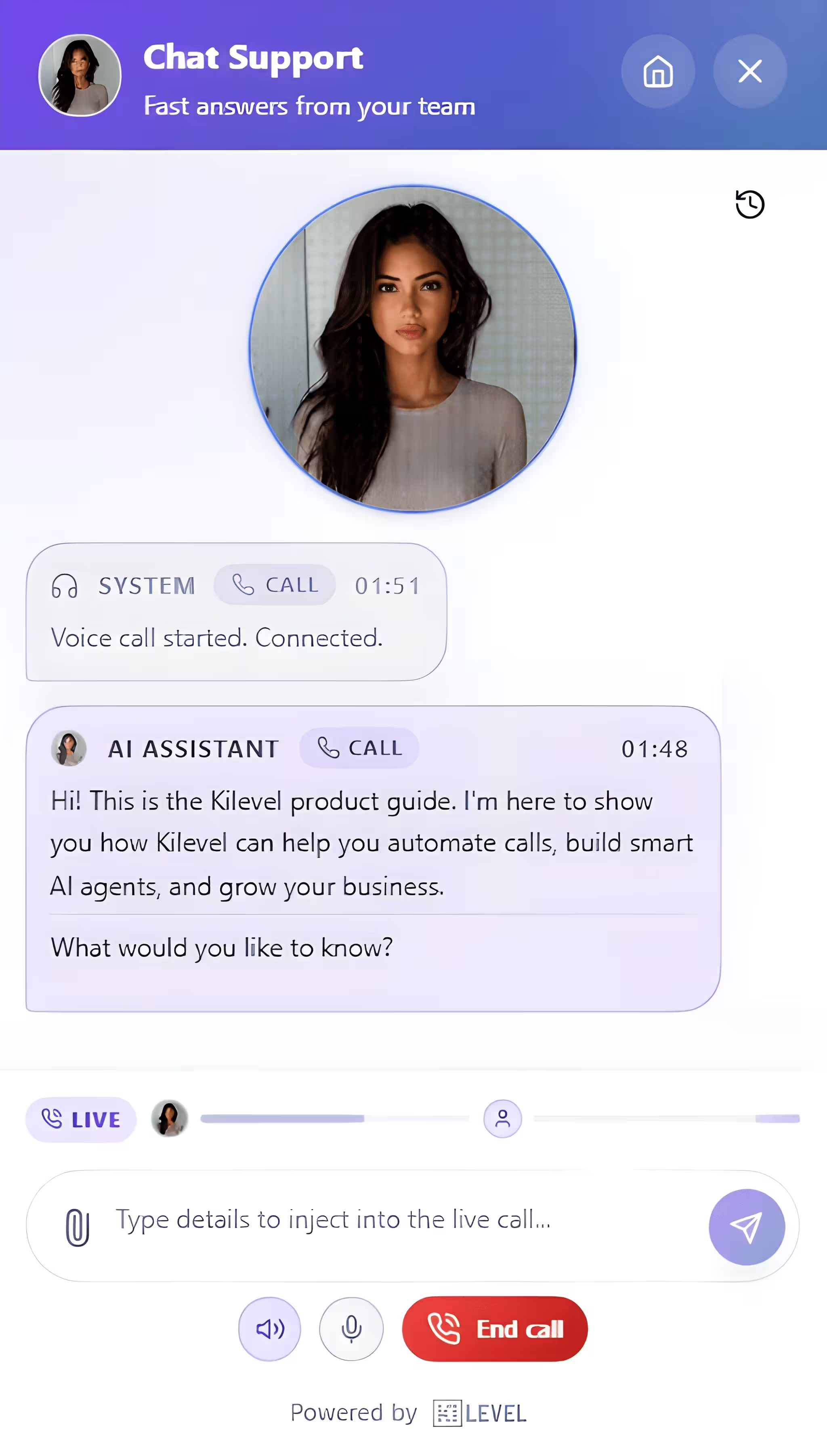
A widget runs as chat only, voice only, or hybrid. In hybrid the visitor picks, and can start typing during a call — which is how a postcode or an order number gets entered correctly instead of spelled out three times.

Callback requests that actually call back

A request carries the name, the number, the preferred hour, the page they were on and what they wrote. Switch on auto-call and it becomes a real outbound call row with its own status, rather than an email somebody has to notice.

And the channels that are not your website

A session can also run over SMS, WhatsApp or email. Those conversations are the same object with a different provider on them, and they get a far longer inactivity window, because nobody answers a text in ninety seconds. An email thread stays open for three days, so the reply that comes tomorrow morning lands in the same conversation.

Coming back is not starting again

A session knows the session before it, and sessions hang off a thread that hangs off a contact. Somebody returning tomorrow is a continuation, and how much of the history they see on the way back in is your choice.
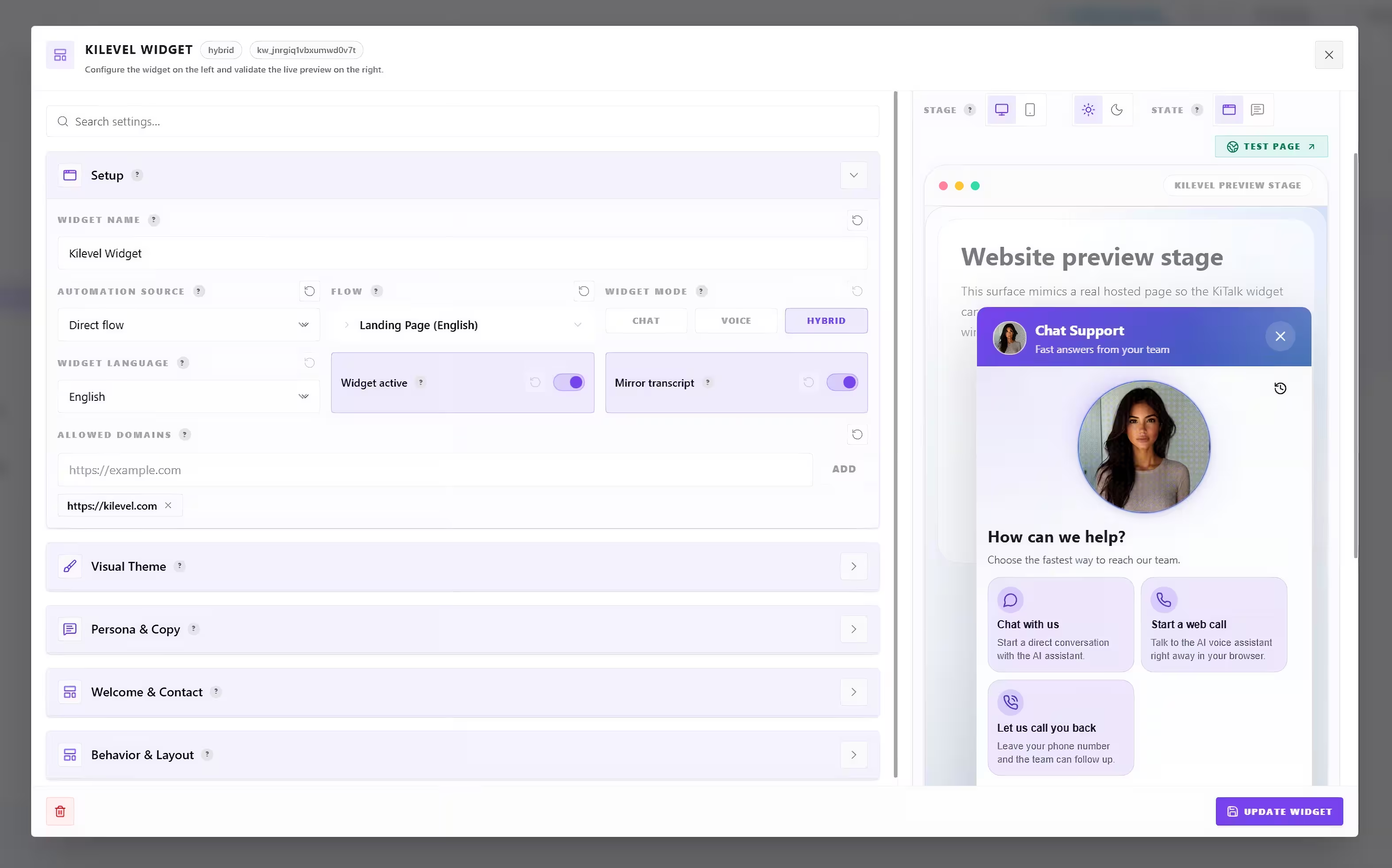
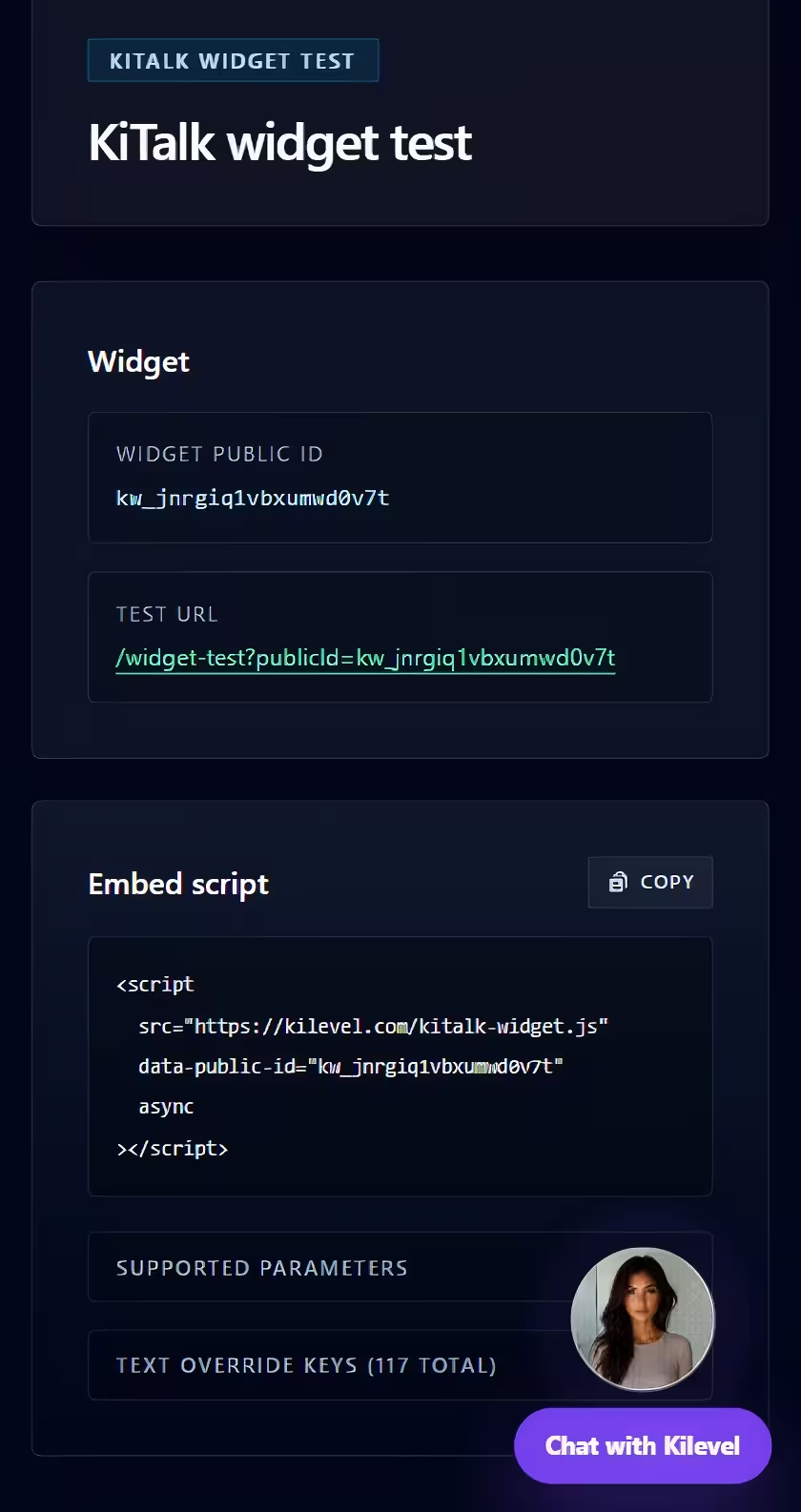
Kilevel widget studio: appearance, enabled channels, greetings, forms and triggers with a live previewKilevel widget embed: a single script tag that drops the widget onto any websiteKilevel widget: chat, voice call, callback request and offline contact form surfaced in one overlayKilevel conversation inbox: live and closed sessions with their channel, status and assigned operator
Enlarge

Every Detail, With the Preview Beside It

Colours, position, greeting, the channels this widget offers, the sound it makes, how much history it shows on return, and which domains are allowed to embed it at all — set in one place, with the thing you are configuring rendering as you go.

And When the AI Should Stop

This is where most support bots fail — not because they did not know the answer, but because the hand-off is a form that asks for everything again. Here, human-active is a state of the same session.

The agent can ask for a human itself

Requesting human support is a tool the agent calls, so escalation is a decision inside the conversation rather than a keyword filter on top of it. The session is flagged and the reason travels with it.

One operator, locked to the session

Taking over switches the session from AI-active to human-active and records who took it and when. Two people cannot both be answering the same visitor while each assumes the other is not.

Or a rule notices before anybody asks

Attention rules run against live chats too — timed by the clock or by message count — reading one field out of a structured output and raising the session on the dashboard when it turns.

Handing back is allowed too

Human-active is a state, not a one-way door. An operator who has resolved the awkward part can return the session to the agent for the rest of it.

What the hand-off carries
Live sessionUsually: a new ticketContext lost, everything asked againHere: human-activeSame thread, same person on the other end
Session stateAI · human
Take-overlocked to one person
Hand backany time

What the Agent Is Allowed to Know and Do

A support agent that can only quote help articles lengthens the path to a person rather than replacing it. These look things up mid-conversation, act, and put real controls in the chat.

Knowledge it searches, not knowledge it memorised

The agent searches and loads your knowledge during the conversation rather than carrying all of it in a prompt. Answers stay current because the source is read at the time of asking.

And knowledge it can be taught

What it learns is stored as a reviewable item attached to the flow — visible, editable and removable — rather than smuggled into a model nobody can inspect.

The customer's actual record

Orders, tickets, entitlements, whatever you keep — read mid-conversation through a tool you define, so "let me check that for you" is a lookup rather than a stalling phrase.

It can put real controls in the chat

Choices, links and small forms render as controls the visitor taps rather than as a paragraph asking them to type an option. On SMS, WhatsApp or email, where there is no UI to render, the same interaction degrades to numbered lines.

What can appear in the chat
choicelinksform

On SMS, WhatsApp and email there is nothing to render — the same interaction turns into numbered lines there instead of arriving broken.

Tools in the conversation
search_flow_knowledgeload_flow_knowledgelearn_flow_knowledgerequest_human_supportgetsert_customersubmit_complaint

A Widget Is a Public Endpoint

It sits on every page with no login in front of it, and every session costs money. These are the parts nobody advertises and the ones that matter the day somebody notices.

Domains that may embed it

The widget carries an allow-list. A snippet lifted off your page does not run on somebody else's, which is the difference between a public widget and an open account.

Three separate rate limits

Messages per minute, messages per minute within one session, and new sessions per minute from one address. Three different abuses, three different ceilings.

Sessions that end honestly

Closed by the team, closed by the AI, closed by the contact, timed out, or over its duration limit. Five reasons, recorded, so your resolution rate is not quietly counting abandonments.

Why a session ended
Closed by team
Closed by AI
Contact left
Inactivity timeout
Duration limit
Still open

A resolution rate that counts abandonments is not a resolution rate. So the reason is a field of its own.

And What the Case Is Worth Afterwards

Every finished conversation — handled by the AI, by a person, or by both — is analysed with the same machinery a phone call gets. What is measured is not only whether it was resolved but what the journey cost.

What the journey cost
RepeatedOn holdHanded overContactResolved
Effort (CES)4.6 / 7
First contact62%
Had to repeat38%

Illustrative values.

Fields from the support pack
diagnosisQualitycustomerHadToRepeatholdCounttransferCountexpectationSetknowledgeGapExposeddocumentationGapslaBreachRisk

Knowledge and documentation gaps point at the process rather than at the person. The whole pack is under Performance Analytics.

What Teams Actually Run With It

Six conversations, one record per customer.

The question that never needed a person

"Where is my order" is answered by reading the order, not by quoting a help article about orders. The session closes with a reason and a structured record of what was asked and what was done.

Chat opensSearch knowledgeOrder lookupResolved

The escalation that does not restart the story

The agent asks for a human. Somebody takes the session, reads what has already been said, and carries on in the same thread. The customer never types their order number a second time.

Frustration risesAsk for humanOperator takes itSame thread

Talking and typing at the same time

Mid-call the agent puts a short form in the chat beside it. The IBAN, the address, the reference number get typed correctly the first time while the conversation keeps going.

On a callForm in chatTyped, not spelledConfirmed

Out of hours, not out of reach

At 23:40 the widget collects a callback request with the hour they would like. At 09:00 the platform places the call itself, with the page they were reading and their message already in hand.

After hoursCallback form09:00 auto-callHandled

The ticket writes itself

When a conversation closes, the fields that matter — product, symptom, what was tried, whether an SLA is at risk — are extracted and posted into your ticketing system with the transcript attached.

Session endsExtract fieldsTicket createdOwner notified

Answering in a language nobody on shift speaks

The agent handles the conversation in the visitor's language. When it escalates, the operator gets the thread they can read, and the reply goes back out in the language it came in.

Visitor writes DEAgent answers DEEscalatesEN operator

When the escalation goes to a phone: the webphone, queues and live monitoring live under Softphone & Contact Center, and everything that should happen after the conversation lives under Automations & Workflows.

AI Assistance

And you do not have to build any of it by hand

The agent, the lookups it performs, the forms it puts in the chat, the widget itself and the fields a finished conversation leaves behind are all buildable and editable with AI assistance.

The support agent, written from your policy

Describe what you support and where the limits are, and the assistant writes the agent: the tone, the questions it must ask before acting, and the point at which it stops and asks for a person.

The lookups it needs, built

If answering properly means reading your order system, the assistant builds that tool end to end — parameters, request, and the mapping of the response back into something the agent can say.

And the forms and choices in the chat

Which fields to collect, what the options should be, when a link is better than a paragraph — proposed as real interactions rather than as instructions telling the model to "ask the user".

The widget, matched to your site

Colours, greeting, position, which channels to offer and how much history a returning visitor sees — described once instead of clicked through setting by setting.

The fields the ticket should carry

It proposes the structured output too, so a finished conversation leaves typed fields you can route and report on, rather than a transcript somebody has to read to categorise.

And it says what it assumed

Your refund threshold, your escalation path, your out-of-hours policy — it lists what it had to guess and asks, instead of writing a plausible number into a live support agent.

Every proposal arrives as an explicit list of edits with the reason each one is in the plan, and a support agent is one of the places where reviewing that before it goes live matters most.

One
Thread per Contact

Chat, call, callback and form all write into it

Five
Ways a Session Ends

So an abandonment never counts as a resolution

0
Times to Repeat Yourself

The hand-off is a state of the same session, not a new ticket

1 Tag
To Embed

One script tag, no build step, on any domain on your list

Next step

Ready to Transform Your Call Operations?

Join Europe's largest infrastructure enterprises already running their call operations on Kilevel with premium AI quality.

FAQ

Frequently Asked Questions

Everything you need to know about Kilevel.

Kilevel is a full-stack AI operations platform for businesses that communicate at scale. It unifies phone calls, WhatsApp, SMS, email, and web conversations under a single AI-native operating system, with visual workflow automation, omnichannel inbox, AI conversation analysis, and real-time operational control. From solo operators to enterprise teams, Kilevel runs autonomously across your entire communication stack.

Legacy IVRs follow rigid scripts. Chatbots handle text in isolation. Kilevel is an AI-native operations platform that handles real phone calls, WhatsApp, SMS, email, and web conversations simultaneously, with genuine contextual understanding. Agents adapt mid-conversation, book appointments, trigger follow-up automations, analyze every interaction, and hand off to humans when appropriate. The entire stack runs from a single platform: inbound queue, outbound campaigns, post-call intelligence, and operational reporting.

Yes. You can build and test your AI agent for free using our library of ready-made industry templates or by starting from scratch. Design call flows, configure channels, and connect integrations before going live. When you deploy, you pay a monthly subscription fee, which already includes a bundle of free AI minutes per month. Any usage beyond the included allowance is billed on a pay-as-you-go basis. No seats, no surprise fees.

No seats, no per-user charges. Kilevel combines a monthly subscription with usage-based pricing: each plan includes a pool of free AI minutes per month, and additional usage beyond that is billed at a per-minute rate. Building, testing, and configuring agents is free. Once live, costs scale predictably with your volume. Enterprise customers with high-volume commitments can discuss custom pricing agreements.

Most teams ship their first agent within a day. Kilevel comes with a library of industry-specific templates that cover the most common call flows and channel configurations out of the box. Pick a template, configure your agent's persona and rules, connect your tools, and deploy, no code required. Custom flows are built visually, and the AI flow assistant can generate an entire flow structure from a single descriptive sentence.

Kilevel gives your team leverage, not a replacement. AI agents absorb the volume of after-hours calls, common questions, appointment bookings and multilingual conversations, so your staff can focus on complex cases that genuinely need a human. Built-in sentiment analysis and configurable handoff triggers mean the AI always knows when to step aside.

The platform, the database and your recordings run on Google Cloud in Frankfurt, Germany, and the telephony infrastructure sits in a German data centre. Speech and language providers are used through their EU endpoints wherever the provider offers one. Where a provider processes outside the EU, that transfer runs on Standard Contractual Clauses, and every such provider is named with its processing region in our public Trust Center. An Article 28 data processing agreement applies from day one, with no separate negotiation, and we never use your data to train models.

Yes. Agents can detect a caller's language and respond accordingly, or you can configure language-specific flows per channel. This is particularly relevant for European businesses serving customers in German, French, Spanish, Dutch, and other languages alongside English, all within the same platform, without duplicating your entire agent setup.

No. The platform is designed for operators first. Flow building, agent configuration, channel setup, and integration connections are all no-code. Developers who want deeper control get a full REST API, webhooks, MCP-compatible tool discovery, and prompt-level customization, but none of it is required to run a production deployment. Non-technical teams operate Kilevel every day.

Completely. Every flow, agent behavior, escalation rule, and analysis signal is configurable, visually, without code. You define the tone, language, fallback responses, and handoff conditions. Advanced users can go further with prompt modules, templating parameters, flow templates, and a full REST API. If your workflow is unusual, Kilevel almost certainly supports it.

Complete control. You define tone, language, permitted topics, and response templates using prompt modules and templating parameters, reusable building blocks your agents draw from consistently. Escalation rules trigger human handoff based on sentiment, topic, or conversation outcome. Every configuration is fully testable in a sandbox before it touches a real customer.

You have full control over what your agent says. Define tone, language, and exact response templates. Escalation rules let you specify when a conversation gets transferred to a human, based on topic, negative sentiment, or repeated failed attempts. Everything is testable before it goes live, and you can iterate on agent behavior at any time.

Yes, and often without any setup at all. Kilevel supports MCP (Model Context Protocol), which means it can automatically discover and digest integrations from modern CRMs, ERPs, and data platforms. For everything else, there are webhooks, a REST API, and pre-built connectors. Your data flows in and out on your terms.

Both directions are fully supported. Kilevel uses MCP (Model Context Protocol) to automatically discover and integrate modern CRM and ERP systems, often with zero connector setup. In the other direction, Kilevel's REST API lets your own tech stack trigger calls, campaigns, and automations externally, and pull conversation results, analysis, and outcomes back into your systems on demand.

Yes, automatically. Kilevel scales concurrent lines dynamically, whether you're handling 10 conversations or 10,000, the infrastructure adjusts without manual intervention. The Operations Control Center gives you live visibility into concurrency, queue depth, and agent performance, so you're never operating blind at scale.

Your data sits in Frankfurt, Germany: platform, database and recordings on Google Cloud, telephony in a German data centre. Credentials are encrypted at the column level with AES-256-GCM, every query is scoped to its owning account, sub-users carry project-specific roles, and administrative actions are written to a reviewable audit trail. We process only on your documented instructions and never train models on your data. The full subprocessor list, with the processing region of each, is published in our Trust Center.

Kilevel agents are designed to manage uncertainty without frustrating the caller. They can ask clarifying questions, offer alternate paths, or escalate to a live operator, automatically, based on rules you set. The Attention Suite enables immediate human takeover mid-conversation without any disruption to the customer experience.

Kilevel agents handle uncertainty without derailing the experience. They can ask clarifying questions, reroute the conversation along alternate paths, or escalate to a live operator, all automatically, based on configurable rules. The Attention Suite lets operators intervene instantly mid-call, taking over the conversation without the customer noticing any disruption.