
A Row Is Not a Phone Call
It is a state machine. It waits until it is allowed to run, passes a gate that checks the window and the capacity, moves through dialled, ringing, talking and ended — and depending on the outcome either joins the finished pile or goes back to the queue. Every one of those states has a name, and every failure keeps the stage it happened at.
A window, not a free-for-all
Each job carries the earliest and latest local time it may dial in. Rows that come up outside it are held rather than burned, and a job scheduled for next Monday simply waits.
A ceiling you set, and one the platform sets
Maximum concurrent calls is a per-job number. Underneath it, every phone number carries its own concurrency line, so one runaway campaign cannot consume the capacity of the number your inbound support runs on.
Busy, no answer and voicemail, separately
Retries are three independent switches, not one. Retry a busy tone and skip voicemail, or the other way round, with your own attempt cap and your own delay between attempts.
The numbers it is allowed to use
A job dials from an explicit list of your own numbers, so the caller ID a region sees is a decision rather than whatever the pool handed out, and a forwarding number is on the job for the calls that need a person.
Every column is a placeholder
The columns you keep from the sheet travel with the row and are available to the prompt, to the tools and to the branches. The agent can open with the renewal date because the renewal date is in the row.
It tells your systems when it is finished
A completion webhook fires when the job drains, and it is retried on a backoff with the attempt count, the last status code and the last error kept on the job — so a webhook your side dropped is visible instead of silent.
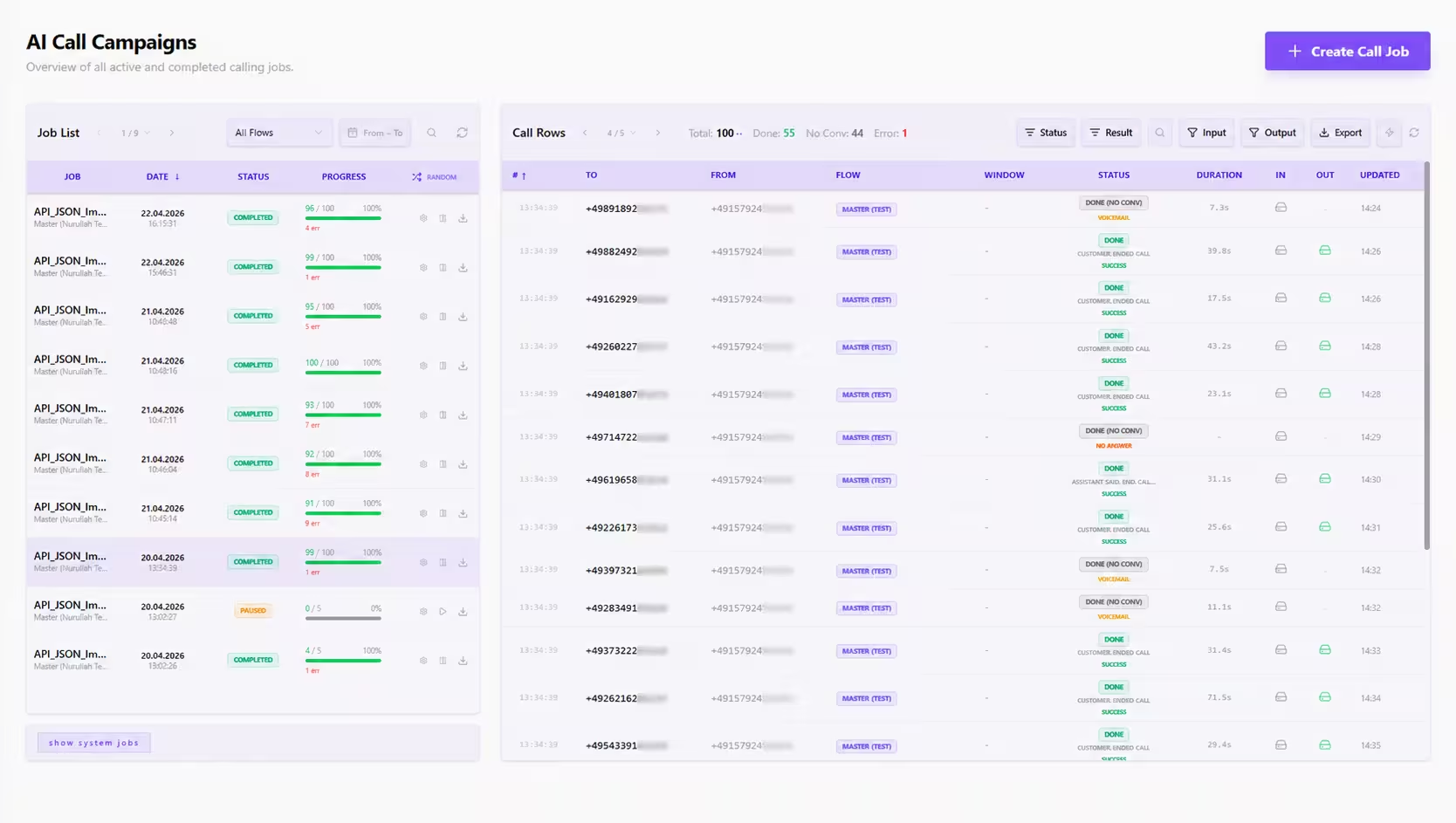


A List Goes In. A Job Comes Out.
Upload a sheet, map its columns, and every column you keep becomes a placeholder the agent can say out loud. The job itself carries the rules: which of your numbers it is allowed to dial from, how many calls may be in flight at once, the hours it may run in, when it starts, and what counts as worth trying again.
What the Agent May Do While It Is on the Phone
An outbound agent that can only talk is an answering machine with opinions. These run mid-sentence, against your real data — and anything a tool writes ends up on the same row as the transcript.
Qualify, and write the answer down
Submit a lead, look one up, update the one it is speaking to, or check what happened on this number the last three times anybody called it. The agent is not guessing at context it could simply read.
Book it while they are still on the line
Real availability, a real appointment, a real confirmation — from inside the call, against the same calendar your booking page reads. Or a follow-up scheduled for a date the prospect chose themselves.
Hand it over, or reach a keypad
Transfer the call to a person or a queue, send DTMF tones through an IVR that stands between the agent and the human it wants, or ask for human support and let the platform find one.
Start and stop the recording itself
Recording is a thing the agent can turn on and off mid-call, which is what makes a genuine consent step possible: ask, and only then start. It is also how a card number stays out of the file.
And whatever you build yourself alongside them — against any HTTP endpoint, any MCP server, any of your own data stores.
And After That, the Board
A call job ends. A relationship does not. A campaign is the stage list behind it — with its own outcomes, its own evaluation fields, rules that push contacts along, and human owners per stage. Cards move because conversations happened.
Stages you define, on a board
A campaign carries its own stage list, and contacts move through it. The board is not a fixed CRM pipeline we shipped — it is the stages your business actually has, and you can keep more than one perspective on the same contacts.
Results and evaluation fields
What counts as an outcome is a list you write, and what gets judged about each contact is another. Both are campaign-level definitions, so two campaigns can disagree about what "qualified" means without either of them being wrong.
Rules that move contacts for you
Campaign automation rules read the result of a conversation and act: advance the stage, assign an owner, start the next attempt, fire a workflow. The board moves because the calls moved it, not because somebody dragged a card.
Which humans own which stage
Human agents are assigned per stage, so a contact that reaches "negotiation" lands with the people who handle negotiation. The AI worked the top of the funnel; the org chart takes the bottom.
Duplicates, decided once
When the same number arrives again, a campaign either skips it or re-adds it — a setting, not an accident. Priority decides which campaign gets the line when two of them want the same contact.
Its own hours, and its own pause
A campaign has a start time and a calling window of its own, and four honest states: active, paused, completed, archived. Pausing is a first-class thing rather than deleting the thing and rebuilding it later.
The Moment a Person Should Be Holding This One
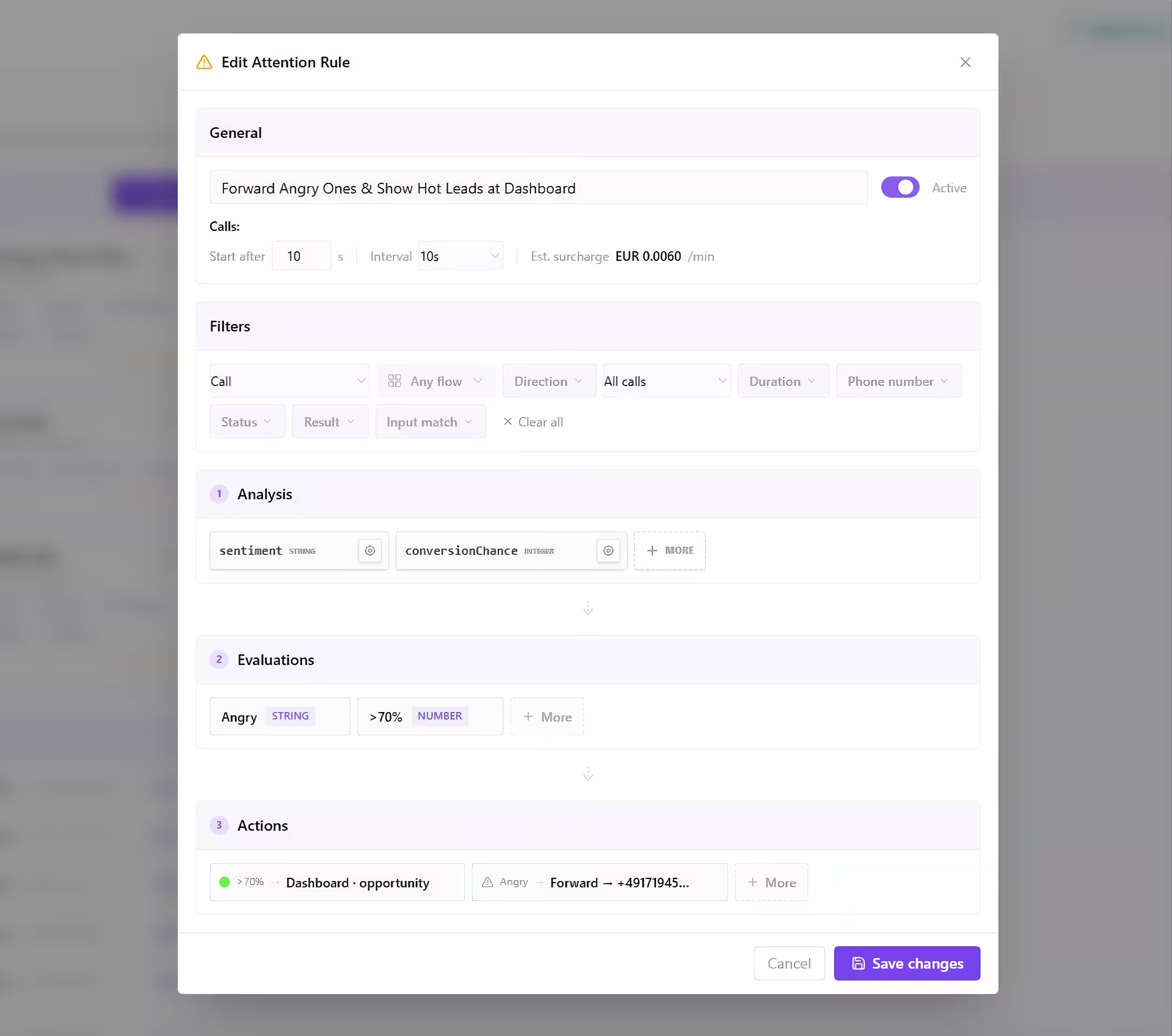
Most platforms score a conversation once it is over. That is too late for the one call where it mattered. Attention evaluates the same schema against the conversation in progress, at an interval you choose, and is allowed to act before anybody hangs up.
The rule runs on the live call
Pick a structured output, pick one field inside it, and set how often it should be re-evaluated and how long to wait before the first look. The rule then reads that field out of a conversation that has not finished yet.
Three things it can do about it
Raise the session on the dashboard in its own colour and tags for as long as you specify, play a sound at the supervisor desk, or forward the call to a number and be done with it.
Calls and chats, the same way
A rule targets calls, chats, or both. On a chat it can be timed by the clock or by message count, because "every thirty seconds" is the wrong unit for a conversation somebody is typing.
A log of what it saw and what it did
Every evaluation run and every action outcome is written down and linked back to the call or chat it came from. A rule that fires too often is a thing you can look at rather than a thing people complain about.
Illustrative values — the delay, the interval and the visibility window are settings rather than defaults we chose for you.
Where the call gets handed to is a page of its own: the browser webphone, queues, screen-pop and live monitoring all live under Softphone & Contact Center.
What a Call Leaves Behind
An outbound programme rarely fails at the dialling. It fails because after two thousand calls nobody can say where the conversations are dropping out. So every row carries typed fields rather than prose, and every field can carry the sentence it was inferred from.
Illustrative. The biggest drop is almost never at the close; it is at the step where nobody asked — and that is a field, not a feeling.
The same rows feed the scorecards and the “Sales & Outbound” metric pack under Performance Analytics.
What Teams Actually Run With It
Not toy examples. Each of these is one job, one agent and a handful of rules.
Qualify the cold list, book the good ones
The agent works the list inside the window, asks the qualifying questions, and for anyone above the bar reads live availability and books the meeting on the call. Everybody else leaves a scored row and a reason.
Escalate the hot one before it cools
An Attention rule re-reads the buying-signal field every fifteen seconds. The first time it comes back high, the call is forwarded to the sales desk and the card goes up on the wallboard in red.
Give up on the phone, not on the lead
Two retries on no-answer at a delay you set, and when the third attempt lands nowhere the row leaves the dialler and enters a workflow that sends a message instead. Channel exhaustion is a branch, not a dead end.
Speed-to-lead, measured in seconds
A form post reaches your hosted webhook, a call is placed inside a minute while the page is still open, and the campaign rule advances the stage and assigns an owner based on what the conversation actually established.
Test the pitch before it meets a customer
Twenty simulated prospects with different objections run against your outbound agent every night, and the transcripts are graded on the same scorecard your real calls are. A regression shows up before a prospect finds it.
The AI keeps the promise the human made
A seller sets a follow-up date on the contact and moves on. On the day, the agent calls with the previous conversation in hand, confirms or reschedules, and puts the outcome back on the same board.
And you do not have to write any of it by hand
The agent, the fields it extracts, the campaign stages, the rules that move contacts between them and the tools it needs mid-call are all buildable and editable with AI assistance, the same way everything else on Kilevel is.
The agent, written from the brief
Describe who you are calling and what you need to find out, and the assistant writes the agent: the opening, the qualifying questions, the objection handling, the point at which it should stop and hand over.
The fields you will want to sort by
It proposes the structured output too — which fields to extract, what scale each one lives on, and which of them should carry the sentence it was inferred from. That is what makes a finished list sortable instead of readable.
Campaign stages and the rules between them
Stages, results, evaluation fields and the automation rules that move a contact from one to the next are all drafted from the same description, as a reviewable list of edits rather than a finished thing you have to unpick.
The integration it needs, built
If qualifying properly means reading your CRM mid-call, the assistant builds that tool: the parameters, the request, the mapping back into the conversation. Not a placeholder named "check_crm".
Attention rules with a preview
Say what should get a supervisor out of their chair and it writes the rule against a field that actually exists, with the branch and the action filled in, before it ever runs against a real call.
And the opening line, in every language you dial
Including the disclosure. Where the law requires the person to be told they are speaking to a machine, the assistant writes that sentence in the language of the call rather than leaving you to translate a compliance requirement.
Every proposal arrives as an explicit list of edits with the reason each one is in the plan. You accept it, reject it, or change it before anything touches a live campaign.
The Parts the Law Has Something to Say About
Automated outbound is the most regulated thing on this platform, and we treat that as a product requirement rather than a footnote.
It says it is an AI, first
Where the EU AI Act requires it, the disclosure is an opening the platform enforces rather than a line somebody remembered to put in a prompt — in the language of the call.
Consent before the recorder runs
Recording is a tool the agent controls, so the flow can ask and only then start, and stop again for the part nobody should keep. In Germany that is the difference between a recording and an offence.
Hours are enforced, not advisory
The call window lives on the job and on the campaign. A row that comes due at 21:40 does not get dialled because a scheduler was busy at the time.
Legal notice: AI-powered outbound calling is only lawful where recipients have given prior explicit consent, or a legitimate interest under applicable law (e.g. GDPR Art. 6) has been established and documented. Operators must comply with the EU General Data Protection Regulation (GDPR), the ePrivacy Directive, and any national telecommunications and consumer-protection rules in the jurisdictions they dial into. The Kilevel platform provides technical infrastructure only, legal responsibility for compliant use rests solely with the operator.
From to-do to done, retry pending and failure stage included
Busy, no answer and voicemail, each its own switch
Attention reads the same schema before anybody hangs up
Every row carries typed fields with their reason, not prose